
Bus 351
Is the bus late? A message answers before I get to the stop.
A workflow checks the live departure board for route 351 a few times each weekday, compares the estimated time with the timetable, and sends one sentence to WhatsApp. On schedule, running late, running early, or not tracked yet.
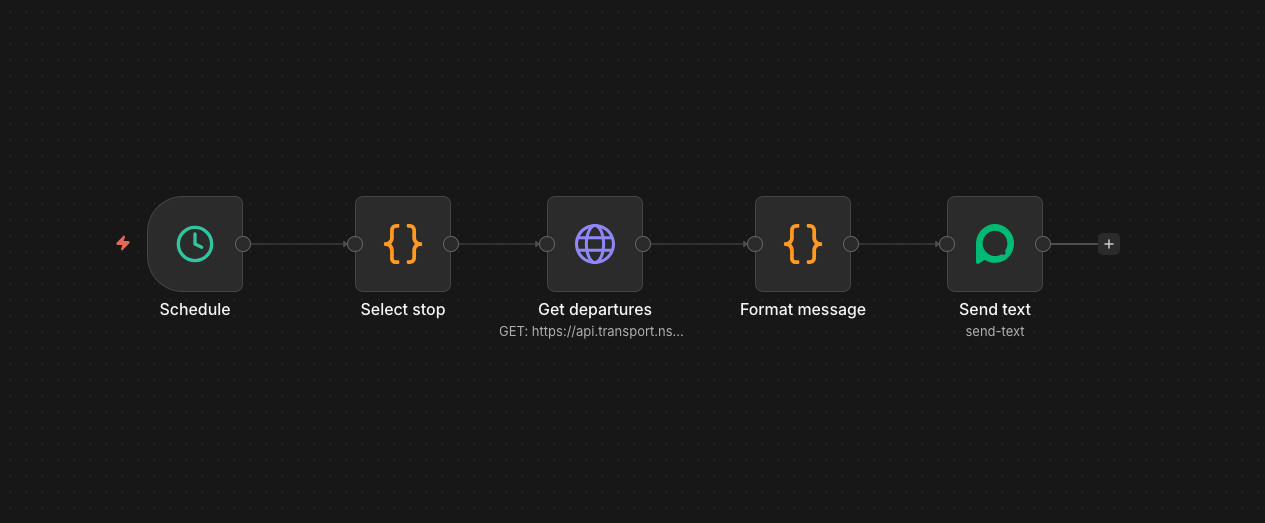
A message, not a departure board
The trip planning API returns a full board: every route at the stop, with planned and estimated times. Reading it on a phone while walking is a poor experience. The workflow reduces all of it to the one decision I actually make — leave now, or wait.
The steps
- Schedule — three cron expressions on weekdays: every 10 minutes from 8:00, 14:50, then every 10 minutes from 15:00.
- Select stop — a Code node reads the hour in
Australia/Sydneyand picks a stop ID. Morning runs use one stop, afternoon runs use another. This matters because the schedule events fire in server time, not local time. - Get departures — calls the Transport for NSW
departure_monendpoint withrapidJSONoutput and an API key header. - Format message — filters
stopEventsto route351, drops anything that has already left, sorts by estimated time and compares it with the planned time. - Send text — posts the sentence to a WhatsApp group through the Evolution API node.
The message the code produces
If there is live tracking, the difference between planned and estimated becomes plain language. A difference of zero is “Bus 351 is on schedule.” A positive difference reports how many minutes late it is, a negative one how many minutes early. Without tracking, the message falls back to the scheduled time so the silence is not mistaken for a delay.
No departures in the window produces “Bus 351: no upcoming departures found.” Matching on the route number, rather than the first result in the board, is what keeps a neighbouring route out of the message.
What is still fragile
Buses that left in the last two minutes are kept, so a slightly stale departure does not vanish mid-check. Code and time zone logic live inside the workflow rather than next to the rest of the codebase, so there are no tests around the format step. The stop IDs are also hard-coded; replacing them with a lookup by stop name would make the workflow portable.